









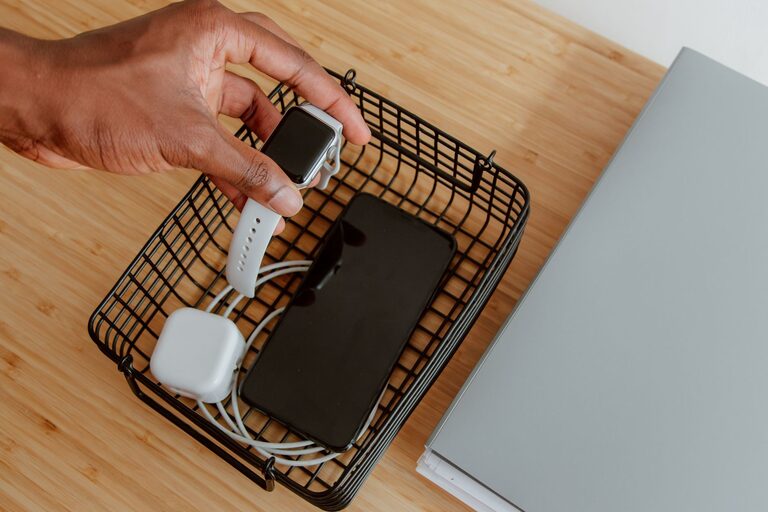
Setting up a dedicated charging station at home can help you keep your devices organized, ensure they are always powered up, and reduce clutter from tangled cords. Whether you have smartphones, tablets, smartwatches, or other gadgets, having a centralized spot for charging saves time and makes daily routines smoother.
In this guide, we’ll walk you through everything you need to create an effective charging station that fits your space and device needs.
Why Set Up a Charging Station?
Before diving into the setup process, let’s look at some benefits of having a dedicated charging station:
– Organization: Keeps cables and devices neat and in one place.
– Convenience: Easily find and charge devices without searching for chargers.
– Safety: Reduces the risk of tripping over cords or overloading outlets.
– Better Charging Management: Avoids overcharging by using smart chargers or timers.
– Aesthetic Appeal: Creates a tidy, clutter-free area that looks good in your home.
Step 1: Choose the Right Location
Selecting a location is the first and most important step. Consider these factors:
– Accessibility: Choose a spot where everyone in the household can easily reach.
– Power Source: Make sure the area has enough electrical outlets or can accommodate a power strip safely.
– Surface Space: Pick a table, shelf, or desk with enough room to hold your devices and chargers.
– Ventilation: Avoid enclosed spaces that might cause devices to overheat while charging.
Popular locations include:
– Entryway console tables
– Kitchen counters
– Home office desks
– Nightstands in bedrooms
Step 2: Gather Necessary Equipment
To build your charging station, you’ll need some basic items:
– Charging cables: USB-C, Lightning, micro-USB depending on your devices.
– Charging adapters: Wall chargers, multi-port USB hubs, or wireless charging pads.
– Power strip or surge protector: To safely handle multiple chargers.
– Organizers: Cable clips, holders, or boxes to keep cords tidy.
– Docking stations (optional): Designed to hold and charge several devices simultaneously.
If you want to go wireless, consider devices that support Qi wireless charging along with compatible charging pads.
Step 3: Organize Charging Cables and Devices
Since cables can get tangled easily, organizing them enhances the station’s look and function.
Tips for Cable Management
– Use cable clips or ties: Keep cables bundled and prevent tangling.
– Label cables: Identify each cable clearly to avoid confusion.
– Shorten cables: If cables are too long, use velcro straps to shorten them neatly.
– Route cables: Position cables behind furniture or along walls to keep them out of sight.
– Invest in cable boxes: Hide power strips and excess cords for a clean setup.
Place devices in designated spots. For example, have a specific tray or dock for each device type.
Step 4: Set Up Charging Equipment
Once your cables and devices are organized, plug chargers into the power strip or surge protector. Here are some setup ideas:
– Multi-port USB hubs: These hubs allow several devices to charge from one outlet.
– Wireless charging mats: Place compatible devices on the mat for cable-free charging.
– Combination docks: Some docks feature both wired and wireless charging options.
Ensure the power strip is positioned safely, avoiding areas where water or heat may be present.
Step 5: Add Labels and Personal Touches
Labeling each charging spot can help family members identify where to place their devices. Simple labels or name tags work well.
You can also personalize your charging station with:
– Small plants or decor to make the area inviting.
– LED lights or nightlights for visibility in low light.
– A small clock or calendar to keep track of time.
Step 6: Maintain Your Charging Station
Maintaining the charging station is key to keeping it functional over time.
– Regularly clean: Dust devices, cables, and surfaces to prevent buildup.
– Check cables: Replace worn or damaged cables promptly.
– Update equipment: Upgrade chargers as technology changes.
– Monitor usage: Avoid overloading outlets or using unsafe chargers.
Bonus Tips for an Efficient Charging Station
– Use smart plugs or timers: Automate turning off charging power to prevent overcharging.
– Designate charging times: Especially useful for children’s devices to manage screen time.
– Keep a spare cable stash: For guests or emergencies.
– Consider portability: Use a charging station tray or box if you need to move it frequently.
Conclusion
Creating a charging station is a simple project that offers lasting benefits. By choosing the right location, organizing cables, and selecting appropriate charging equipment, you can enjoy a clutter-free, efficient charging hub that keeps all your devices powered and ready to go. Whether you’re a tech enthusiast or just looking for more organization, this setup will help streamline your daily routine.
Start planning your charging station today, and enjoy the convenience of a well-organized device charging area in your home!